System Requirements & Necessary Tools
System Requirements
Only Windows 10 and 11 fully support Wabbajack. LTSC, special variants, lightened editions or any other modified variant WILL NOT WORK. Your Windows version must be 21H2 or newer to run both Wabbajack and No Man’s Sky Explorer.
Running the list from Hard Disk Drives or external drives is STRONGLY ADVISED AGAINST.
As No Man’s Sky Explorer is a modlist based on graphics, you must have a good graphics card.
Configuration Requise & Outils Nécessaires
Configuration Requise
Seuls Windows 10 et 11 prennent entièrement en charge Wabbajack. Les variantes LTSC, éditions spéciales ou allégées NE FONCTIONNERONT PAS. Votre version de Windows doit être 21H2 ou plus récente.
Exécuter la liste depuis des disques durs (HDD) ou des lecteurs externes est FORTEMENT DÉCONSEILLÉ.
Comme No Man’s Sky Explorer est une modlist axée sur les graphismes, vous devez disposer d’une bonne carte graphique.
If the space requirement is uncomfortable, you can delete downloads once installed.
| Configuration | CPU | GPU | RAM | Storage | Display | FPS |
|---|---|---|---|---|---|---|
| Minimum Specs | i5-7600k | Nvidia GTX 2060 | 16 GB DDR4 | 500 GB SATA II SSD | FHD 60 Hz | 45 |
| Recommended Specs | i7-9700k | Nvidia RTX 3060 Ti | 32 GB DDR4 | 1 TB SATA III/M.2 SSD | FHD 60 Hz | 60+ |
| Author’s Specs | i5-10400f | Nvidia RTX 3090 | 32 GB DDR4 | 1 TB M.2 SSD | 2K 180 Hz | 60+ |
Necessary And Useful Applications
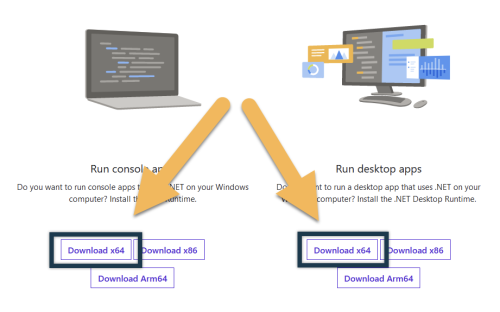
Please ensure you have the latest .NET version installed: https://dotnet.microsoft.com/download/dotnet/5.0/runtime, and also Visual C++ x64.
PageFile Configuration

Bigger NMS modlists need a lot of memory. Never disable the pagefile.
- Press Windows + R → type
sysdm.cpl,3→ Enter - Performance → Settings → Advanced → Virtual memory → Change…
- Disable Automatically manage… → Custom size: Initial 20480 / Maximum 40960
- Set → Apply → OK → Restart
THIS IS NOT OPTIONAL, YOU CANNOT SKIP THIS STEP EVEN IF YOU HAVE 256 GB OF RAM.
Exclusions and AntiVirus

- Exclude 1)
NMS.exe, 2) the game folder, and 3) the shader cache folder from antivirus - Exclude from Control Flow Guard: Start → Exploit Protection → Program Settings → Add NMS.exe → Control flow guard (CFG) → Override → Off
Si l’espace requis vous pose problème, vous pouvez supprimer les téléchargements une fois l’installation terminée.
| Configuration | CPU | GPU | RAM | Stockage | Écran | FPS |
|---|---|---|---|---|---|---|
| Config. Minimum | i5-7600k | Nvidia GTX 2060 | 16 Go DDR4 | 500 Go SATA II SSD | FHD 60 Hz | 45 |
| Config. Recommandée | i7-9700k | Nvidia RTX 3060 Ti | 32 Go DDR4 | 1 To SATA III/M.2 SSD | FHD 60 Hz | 60+ |
| Config. de l’Auteur | i5-10400f | Nvidia RTX 3090 | 32 Go DDR4 | 1 To M.2 SSD | 2K 180 Hz | 60+ |
Applications Nécessaires et Utiles
Assurez-vous d’avoir la dernière version de .NET installée : https://dotnet.microsoft.com/download/dotnet/5.0/runtime, ainsi que Visual C++ x64.
Configuration du Fichier d’Échange
Les grandes modlists NMS nécessitent beaucoup de mémoire. Ne désactivez jamais le fichier d’échange.
- Windows + R → tapez
sysdm.cpl,3→ Entrée - Performances → Paramètres → Avancé → Mémoire virtuelle → Modifier…
- Désactivez Gérer automatiquement… → Taille personnalisée : Initial 20480 / Maximum 40960
- Définir → Appliquer → OK → Redémarrez
CETTE ÉTAPE N’EST PAS OPTIONNELLE, MÊME AVEC 256 GO DE RAM.
Exclusions et Antivirus
- Excluez 1)
NMS.exe, 2) le dossier du jeu, et 3) le dossier du cache de shaders de votre antivirus - Excluez du Control Flow Guard : Démarrer → Protection contre les attaques → Paramètres du programme → Ajoutez NMS.exe → Protection du flux de contrôle (CFG) → Remplacer → Désactivé